
| 일 | 월 | 화 | 수 | 목 | 금 | 토 |
|---|---|---|---|---|---|---|
| 1 | 2 | 3 | 4 | 5 | 6 | |
| 7 | 8 | 9 | 10 | 11 | 12 | 13 |
| 14 | 15 | 16 | 17 | 18 | 19 | 20 |
| 21 | 22 | 23 | 24 | 25 | 26 | 27 |
| 28 | 29 | 30 | 31 |
- NextJS
- fetch
- InteliJ
- react
- ubuntu
- vitejs
- sveltekit
- d3js
- Test
- Spring
- npm
- Java
- vuex
- nodejs
- Shell
- springboot
- Vue3
- Vue
- Python
- 오라클
- JUnit
- Logging
- EUREKA
- post
- loguru
- gradle
- NextJS13
- style
- svelte
- fastapi
- Today
- Total
양군의 행복한 이야기
H2DataBase 설정 법 본문
https://www.h2database.com/html/main.html 접속
Download 클릭
Platform-Independent Zip 다운
원하는 위치에 압축을 푼다.
bin/h2.bat 실행
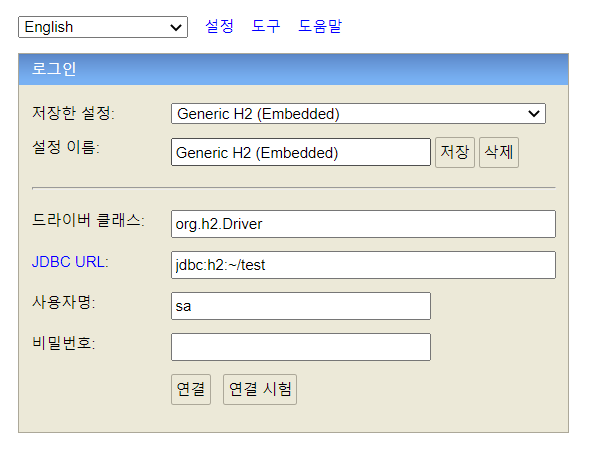
저장한 설정은 Generic H2(Server)로 변경
- 변경하면 URL이 jdbc:h2:tcp://localhost/~/test 로 변경된다.
Embedded는 DB를 종료시 데이터 및 테이블이 저장이 안 된다.
연결 클릭
application.properties
spring.datasource.url=jdbc:h2:tcp://localhost/~/test
spring.datasource.driver-class-name=org.h2.Driver
spring.datasource.username=sa
추가
build.gradle
dependencies {
runtimeOnly 'com.h2database:h2'
}
추가
이방법 말고... 스프링 구동시 자동으로 실행 되는법
build.gradle
dependencies {
runtimeOnly 'com.h2database:h2'
}
추가
spring.h2.console.enabled=true
spring.datasource.url=jdbc:h2:mem:~/test
spring.datasource.driver-class-name=org.h2.Driver
spring.datasource.username=sa
스프링 시작시 로그 확인
localhost:8080/h2-console 로 접속
H2 console available at '/h2-console'. Database available at 'jdbc:h2:mem:4931e9dd-e857-4657-9e48-6375f51bc118'
로그중
표기된 부분을 복사하여 JDBC url에 붙여 넣기